How to Integrate ENC28J60 with lwIP Using an STM32 Microcontroller
Software and Hardware Requirements
To follow this tutorial, you should have completed this section.
What is DNS?
DNS stands for Domain Name System. It is an application layer protocol that allows a domain name such as www.google.com to be resolved to an Internet Protocol (IP) address. This is very important as TCP/IP protocols use IP addresses for communication and not domain names.
Domain names were invented so that humans would not have to memorise IP addresses of sites they have visited or are interested in. For instance, is much easier for a human to remember a domain name like www.google.com than an IP address like 192.168.8.50.
When to use it?
Suppose that you are developing an application in any of the commonly used programming languages: C, C++, C#, Python etc, and you wish to open a TCP socket so that you can start data transmission. Most often you will notice that the function prototypes take IP address as a parameter, in which case you will need to obtain an IP address and pass it to the relevant function.
In the case of lwIP they also decided to require an IP address as an input to some "application layer protocols" functions. For instance MQTT, HTTP etc all require the IP address of the remote server.
NB: Please note that IP addresses of some domain names change continously, therefore it is better to use DNS than resolve the domain name manually and hardcode it in your code. The system will fail down the line should the IP address change.
DNS: Domain Name resolution on Linux
It is always better to use multiple platforms to confirm results that we get from different systems. In this case I used Linux to get an IP address so that we can compare it with the IP address obtained from lwIP. The command to resolve a domain name to an IP address in Linux is:
nestor@nestor:~$ host test.mosquitto.org
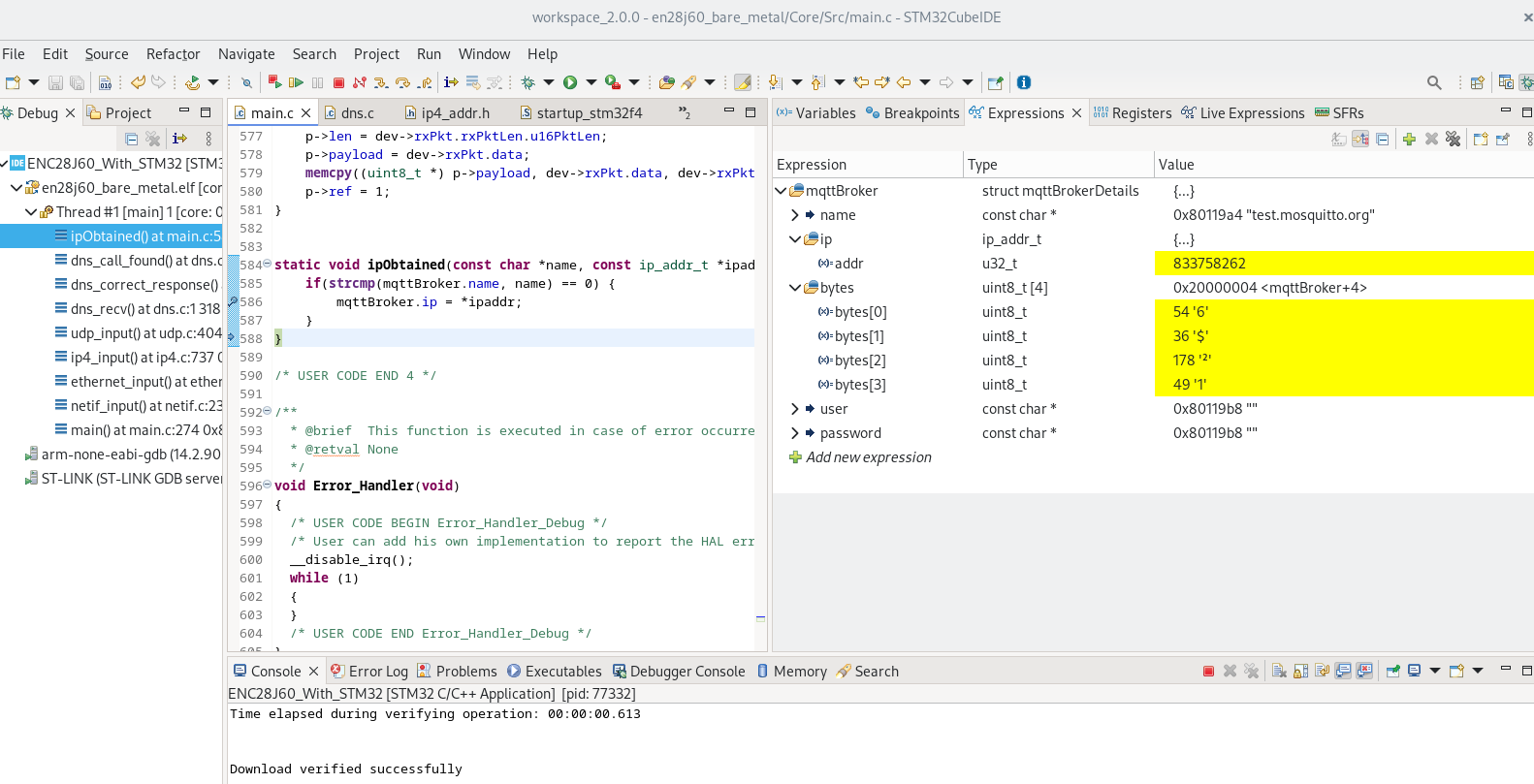
test.mosquitto.org has address 54.36.178.49
test.mosquitto.org has IPv6 address 2001:41d0:303:4831::1
DNS: Domain Name resolution on lwIP
The below are needed for the server to resolve a domain name to an IP address.
void dns_init(void);called during initialization.void dns_setserver(u8_t numdns, const ip_addr_t *dnsserver);also called during initialization.void dns_tmr(void);to be called every 1000 milliseconds.-
void dns_gethostbyname(const char *hostname, ip_addr_t *addr, dns_found_callback found, void *callback_arg);used to resolve a domain name.
One function worth noting is :
void dns_gethostbyname(const char *hostname, ip_addr_t *addr, dns_found_callback found, void *callback_arg);
const char *hostname: Domain name to resolve.ip_addr_t *addr: Where the resolved IP will be stored.dns_found_callback found: Callback when resolution succeeds.void *callback_arg: Optional callback argument (NULL in this case).
The below code snippets show the struct that I defined to be used with DNS functions.
struct mqttBrokerDetails {
    const char * name;
    union {
        ip_addr_t ip;
        uint8_t bytes[4];
    };
    const char * user;
    const char * password;
};
const char *hostname: is a C string for the domain name we want to resolve.union {ip_addr_t ip; uint8_t bytes[4];}: is the IP address stored in a 32-bit variable and also as an array of bytes.const char * user: is a C string for the username login details to be used later for MQTTconst char * password: is a C string for the password to be used later to connect to MQTT
DNS: How to initialize and use DNS on lwIP
dns_init();

// Set the server
ip_addr_t dnsServer;
IP4_ADDR(&dnsServer, 8, 8, 8, 8);
dns_setserver(0, &dnsServer);

ip_addr_t mosquitoIp;
dns_gethostbyname(mqttBroker.name, &mosquitoIp, ipObtained, NULL);
DNS: Callback method upon successful conversion from Domain Name to IP
Once all the code has been executed and the stack resolves the Domain Name to an IP address, the below function will be called:
static void ipObtained(const char *name, const ip_addr_t *ipaddr, void *callback_arg) {
    if(strcmp(mqttBroker.name, name) == 0) {
        mqttBroker.ip = *ipaddr;
    }
}
Confirmation from a screenshot from STM32CubeIDE
Conclusion
In this article we have explained the purpose of DNS Client, when to use it, how to use global functions provided by lwIP to obtain an IP address from a domain name. The source code for the project can be found here - checkout the dns tag.
NB: The union in Figure 2 was added to expose individual bytes. lwIP stores IP addresses as a uint32_t value.